
How to Create a Manufacturing Traveller (Free Template)
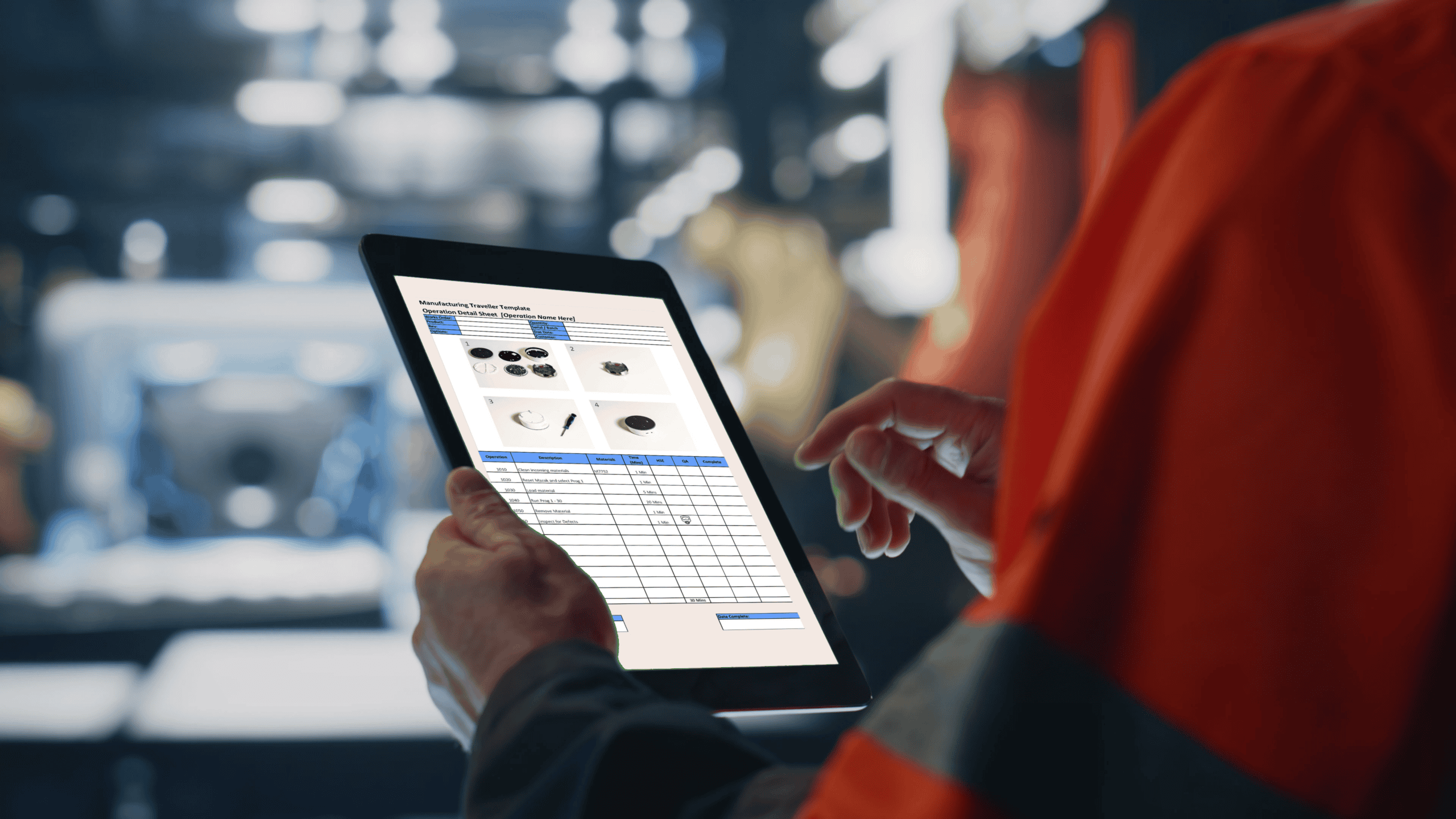
A manufacturing traveller is a document that follows a product through production, setting out each step, what needs to be done, and what must be recorded.
To create one, you define the process sequence, add clear operation-level detail, and include the checks and data needed to ensure every build is completed consistently.
In practice, most travellers break down because they rely on operators to follow them manually. When steps are missed or recorded inconsistently, it becomes difficult to maintain control or traceability across production.
This guide shows how to create a manufacturing traveller that works in real production, not just on paper.
You can jump to the section that matches what you need:
- What is a manufacturing traveller?
- How to create a traveller
- What goes wrong with paper
- Why those problems happen
- What good looks like
- When paper stops working
- Moving to digital travellers
- Download the manufacturing traveller template
What is a Manufacturing Traveller?
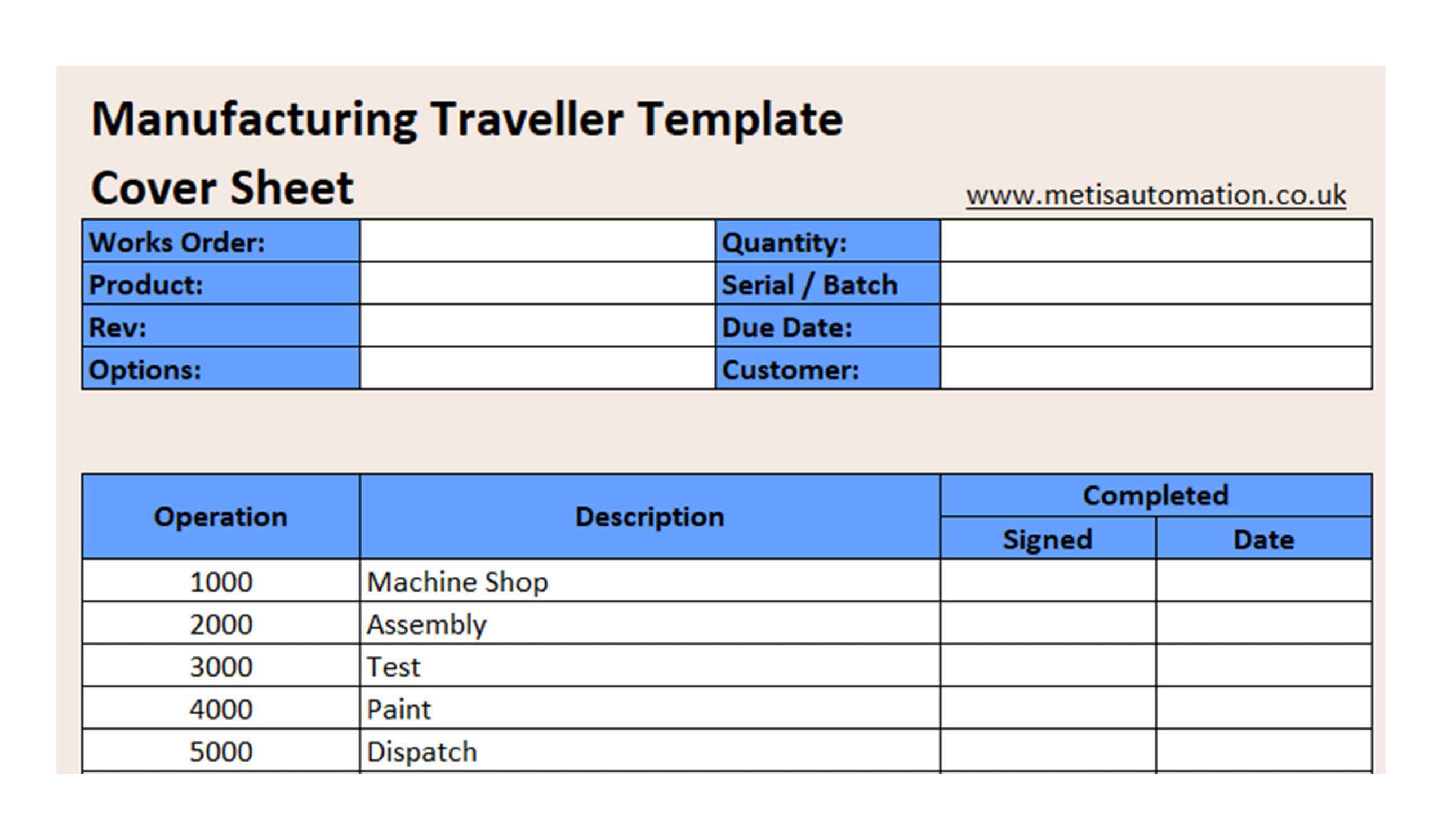
A manufacturing traveller brings together the key parts of the build process.
It defines the sequence of operations, sets out the work instructions for each stage, and includes the checks that need to be completed before moving on.
It also captures the information needed to record the build, such as measurements, serial numbers, or pass/fail results.
How to Create a Manufacturing Traveller (Step-by-Step)
Creating a manufacturing traveller is about structuring the process so it can be followed the same way every time, with the right checks and records built in.
Step 1: Define the build process
Start by listing every operation in the correct sequence.
This should reflect how the job actually runs on the shopfloor, not how it looks on a process map. If the order isn’t clear, operators will make decisions themselves, and that’s where variation starts.
Step 2: Add work instructions
For each step, make it clear what needs to be done.
Keep it concise. The goal is not to document everything, but to remove guesswork at the point of use. Operators should be able to look at the traveller and know exactly what action is required.
Step 3: Embed quality checks
Build quality into the process, not after it.
Define what needs to be checked at each stage, whether that’s a measurement, inspection, or simple pass/fail. These checks should happen before the next step, not at the end of the build.
Step 4: Define data capture
Decide what information needs to be recorded as the job progresses.
This could include serial numbers, torque values, batch numbers, or operator sign-offs. Keep it focused on what you actually need for traceability and accountability.
Step 5: Format the traveller
Structure the traveller so it’s easy to follow under real conditions.
Whether it’s paper, Excel, or a structured document, the layout should be consistent, readable, and quick to use. If it slows people down, it won’t be followed properly.
Step 6: Test it on the shopfloor
Run the traveller in production and adjust based on real use.
Watch how operators interact with it. Where they hesitate or skip steps, something isn’t clear. Refine it until it works without supervision.
What Goes Wrong with Paper Travellers

Manufacturing travellers often look correct on paper, but break down in day-to-day production.
The most common issues show up in how they’re used on the shopfloor:
- Travellers aren’t followed consistently, especially across different operators or shifts
- Data is missing incomplete, or filled in after the fact
- Steps are skipped when production is under pressure
- Multiple versions of the same traveller end up in circulation
- Handwriting or unclear instructions lead to misinterpretation
These problems don’t always show up immediately. They tend to surface when something goes wrong, a defect, a delay, or an audit, and the information needed to understand what happened isn’t reliable, and you can’t clearly show what was done or when.
If this is already happening on your shopfloor, the issue is usually the structure of the traveller itself.
You can start by tightening that structure with a clear template:
Why These Problems Happen
When you rely on manual systems, the process depends on operator discipline rather than control.
There’s no way to enforce the correct sequence, and no real-time visibility of what’s happening during the build. Tools like Excel sit outside the process, so they don’t reflect what’s actually happening on the shopfloor.
Updates don’t always reach operators, especially across shifts, so the process starts to drift.
Over time, that makes it harder to rely on the traveller when something goes wrong.
What Good Looks Like
In a controlled process, every step is followed in the correct order without relying on memory or supervision.
Checks are completed at the point of use, before the job moves on, and data is captured as part of the build rather than filled in later.
The process runs the same way across operators and shifts, and records are complete and easy to retrieve when needed.
When Paper Stops Working
Paper travellers can work at low complexity, but there’s a clear point where they stop being effective. This usually happens as production volume increases and there’s less time to double-check work, or as more product variants are introduced and processes become harder to follow consistently across operators and shifts.
At the same time, audit and customer requirements tend to become stricter, and errors become harder to trace back to a specific step or build.
When you reach this point, improving the document isn’t enough. The process itself needs to be controlled.
This is usually where it helps to step back and look at how the process is actually running across the line.
Moving to a System (Digital Traveller)
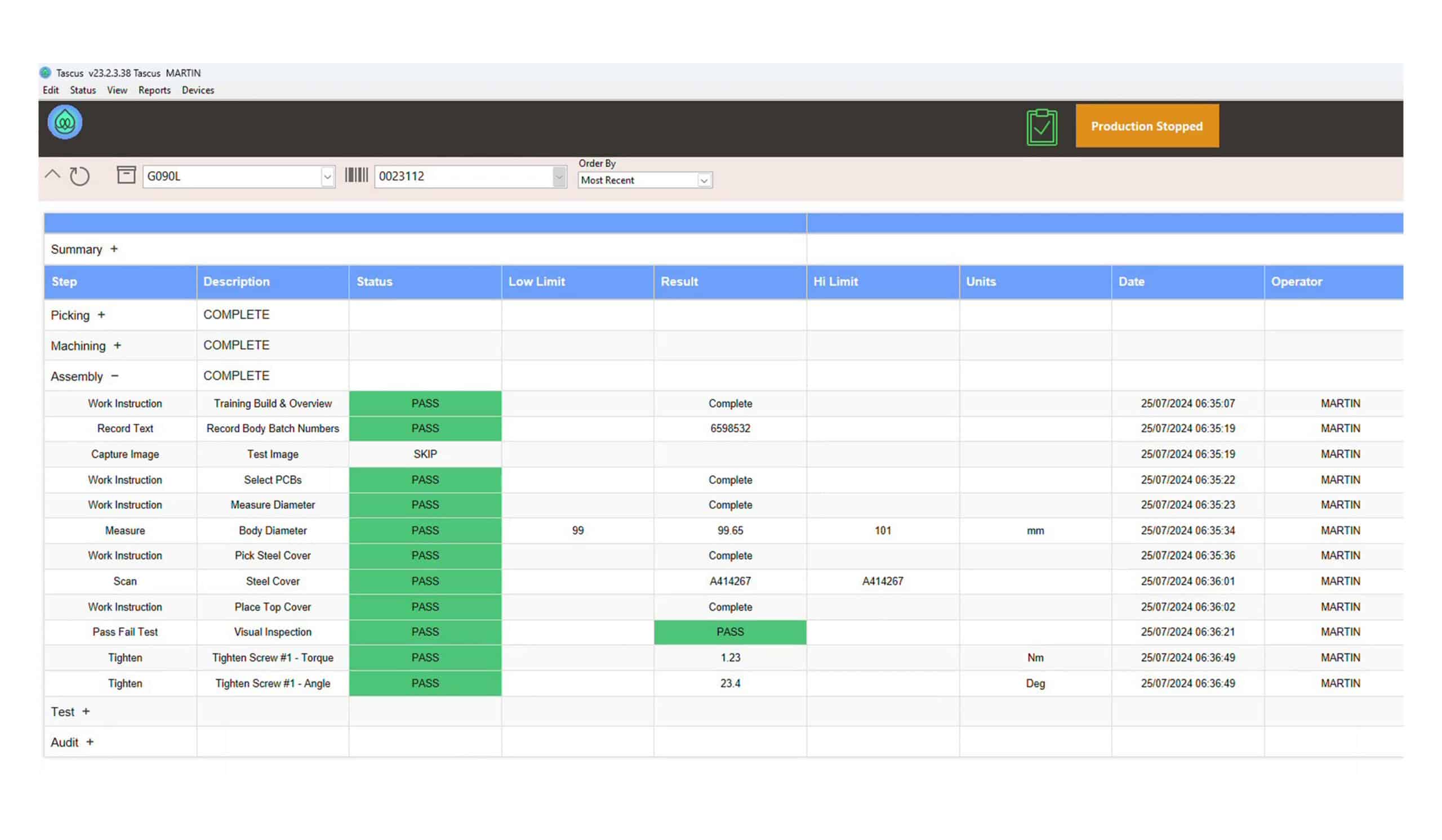
When paper travellers stop holding the process together, the next step is to move to a system that controls how work is done, not just how it’s recorded.
A digital traveller shifts the role from guidance to control. The sequence of steps is enforced automatically, so work happens in the correct order, and checks must be completed before the job can move on. Data is captured in real time at the point of use, and there is clear visibility of what’s happening across the line.
Updates are applied consistently without relying on manual rollout, removing the reliance on memory, supervision, and after-the-fact recording.
Instead of asking operators to follow the process, the system supports them by guiding each step and ensuring nothing is missed. For teams already using travellers, this isn’t a complete change in approach. It’s a progression from documenting the process to actively controlling it.
Download a Manufacturing Traveller Template
If your current traveller isn’t being followed consistently, the quickest place to start is tightening the structure.
Download a manufacturing traveller template and adapt it to your process. It gives you a clear format for defining steps, adding checks, and capturing the data you actually need on the shopfloor.
This is most useful when steps are being missed or completed out of order, when data is inconsistent or filled in later, or when there’s no clear structure across jobs or products.
Frequently Asked Questions
What is a manufacturing traveller?
A manufacturing traveller is a document that follows a product through production, defining each step, what needs to be done, and what must be recorded.
What should be included in a traveller?
A traveller should include job information, the sequence of operations, clear instructions for each step, quality checks, and a way to record completion such as sign-offs or measured data.
Is Excel suitable for manufacturing travellers?
Excel can work at low volume or complexity, but it doesn’t control how the process is followed. As production grows, it becomes harder to keep versions aligned, ensure steps are followed in order, and capture data consistently.
How do you ensure travellers are followed correctly?
To ensure travellers are followed, the process needs to be clear, easy to use, and structured so steps happen in the right order. In manual systems, this relies on discipline and supervision. In controlled systems, the sequence and checks are enforced as part of the process.
What is the difference between a traveller and a work instruction?
A traveller defines the sequence of steps and records what happens during the build. A work instruction explains how to complete a specific task within one of those steps. They work together, but serve different roles.
When should you move to a digital system?
You should consider moving to a digital system when processes vary between operators, data is inconsistent, traceability becomes difficult, or audits require significant manual effort. This usually happens as production volume, complexity, or compliance requirements increase.

Review Your Production Line
The Production Review identifies where variation and delays are happening in your process.